monster
The monster command in rAthena can be used in two main contexts: as a top-level command for permanent monster spawns and as a script command for temporary monster spawns. Let's explore both:
👾 monster Top-Level Command
The monster top-level command is used to define a permanent monster spawn on a specific map in rAthena. These spawns are loaded when the map server starts and will respawn automatically after being killed, based on the configured delays.
Here is the standard structure for declaring a permanent monster spawn:
<map name>,<x>,<y>%TAB%monster%TAB%<monster name>%TAB%<mob id>,<amount>,<delay1>,<delay2>,<event>,<mob size>,<mob ai>
Parameter Explain:
<map name>: This specifies the name of the map where the monsters will spawn.<x>, <y>: These are the X and Y coordinates on the map where the monsters should spawn. If you set both to 0, the monsters will spawn randomly on the map.<monster name>: This is the name that will be displayed for the monsters on screen.<mob id>: This is the numerical ID that identifies the monster record in the mob_db.yml database.<amount>: This is the number of monsters that will be spawned when this command is executed.<delay1>: This controls the fixed base respawn time for the monster, given in milliseconds (1000 = 1 second).<delay2>: This controls the random variance on top of the base respawn time, also given in milliseconds.<event>: This is an optional script event to be executed when the mob is killed.<mob size>: This is an optional field to specify the monster's size.<mob ai>: This is an optional field to specify the monster's AI type.
// Spawns a 1 permanent Poring that has on event once killed.
// That respawn once killed in 10-15 seconds
prontera,169,193	monster	"Friendly Poring"	1002,1,10000,5000,"MyNPC::OnPoringKilled",Size_Small,AI_NONE

// If you do not want to declare the event, and size, just replace it with ,, (nothing)
// You can declare it like this.
prontera,169,193	monster	"Friendly Poring2"	1002,1,10000,5000,,,AI_NONE

//===== rAthena Script =======================================
//= MyNPC
//===== By: rAthena AI Assistant ============================
//= Handles events triggered by the spawned Poring.
//============================================================
prontera,166,190,4	script	MyNPC	767,{
    mes "Hello there! I'm MyNPC.";
    close;

OnPoringKilled:
    // This label is triggered when a "Friendly Poring" is killed.
    // The 'killedrid' variable will contain the mob ID (1002 for Poring).
    // The 'killedgid' variable will contain the unique game ID of the killed mob.
    announce "A Friendly Poring was just defeated by " + strcharinfo(0) + "!",bc_blue|bc_all;
    end;
}
In this script:
prontera,169,193: This is thename of the mapandxandycoordinates where the monster will spawn. If you change the coordinates into,0,0it will respawn it randomly in the target map."Friendly Poring": This is the display name the monster will have on screen.1002: This is themob id, which uniquely identifies the monster in the mob_db.yml database. 1002 corresponds to a Poring.1: This is theamountof monsters that will be spawned when the server loads this script. In this case, one "Friendly Poring" will be spawned.10000: This isdelay1, the fixed base respawn time in milliseconds. So, after being killed, this Poring will respawn after 10 seconds.5000: This isdelay2, the random variance on top of the base respawn time, also in milliseconds. This means the actual respawn time will be between 10 and 15 seconds (10000 + a random value up to 5000)."MyNPC::OnPoringKilled": This is theeventlabel that will be executed when the monster is killed. It specifies that theOnPoringKilledlabel within theMyNPCscript object should be triggered.Size_Small: This sets the visual size of the monster to small.AI_NONE: This sets the monster's AI behavior to none, meaning it will not actively attack or use special AI patterns.
📏 Monster Size (<mob size>)
This parameter determines the visual size of the spawned monster. The valid options are:
Size_Small (0): The default small size.Size_Medium (1): A medium size.Size_Large (2): A large size.
🤖 Monster AI (<mob ai>)
This parameter controls the artificial intelligence behavior of the spawned monster. The valid options are:
AI_NONE (0): This is the default, meaning the monster has no special AI behavior.AI_ATTACK (1): The monster will exhibit aggressive or friendly attack behavior.AI_SPHERE (2): Used for Alchemist's Marine Sphere skill.AI_FLORA (3): Used for Alchemist's Flora skill.AI_ZANZOU (4): Used for Kagerou/Oboro's Zanzou skill.AI_LEGION (5): Used for Sera's Legion skill.AI_FAW (6): Used for Mechanic's FAW skill.AI_WAVEMODE (7): Normal monsters will ignore attacks from monsters with this AI.
👻 monster Script Command
This command is used within an NPC script's code block to temporarily spawn monsters. These monsters typically do not respawn on their own unless explicitly handled by the script.
📝 Command Syntax:
monster "<map name>",<x>,<y>,"<name to show>",<mob id>,<amount>{"<event label>",<size>,<ai>};
Alternatively, you can use the monster's Aegis name:
monster "<map name>",<x>,<y>,"<name to show>",<mob name>,<amount>{"<event label>",<size>,<ai>};
//===== rAthena Script =======================================
//= Monster Summoner
//===== By: rAthena AI Assistant ============================
//= Summons Porings and tracks their kills.
//============================================================
umbala,89,156,4	script	Monster Summoner	459,{
    mes "[Monster Summoner]";
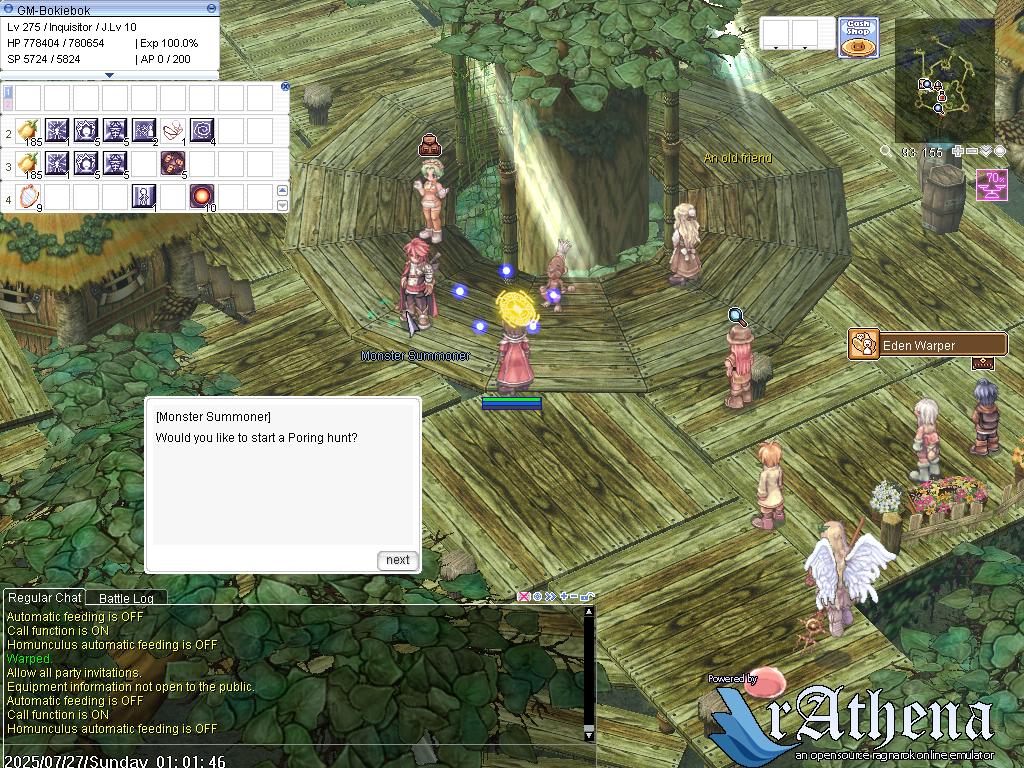
    mes "Would you like to start a Poring hunt?";
    next;
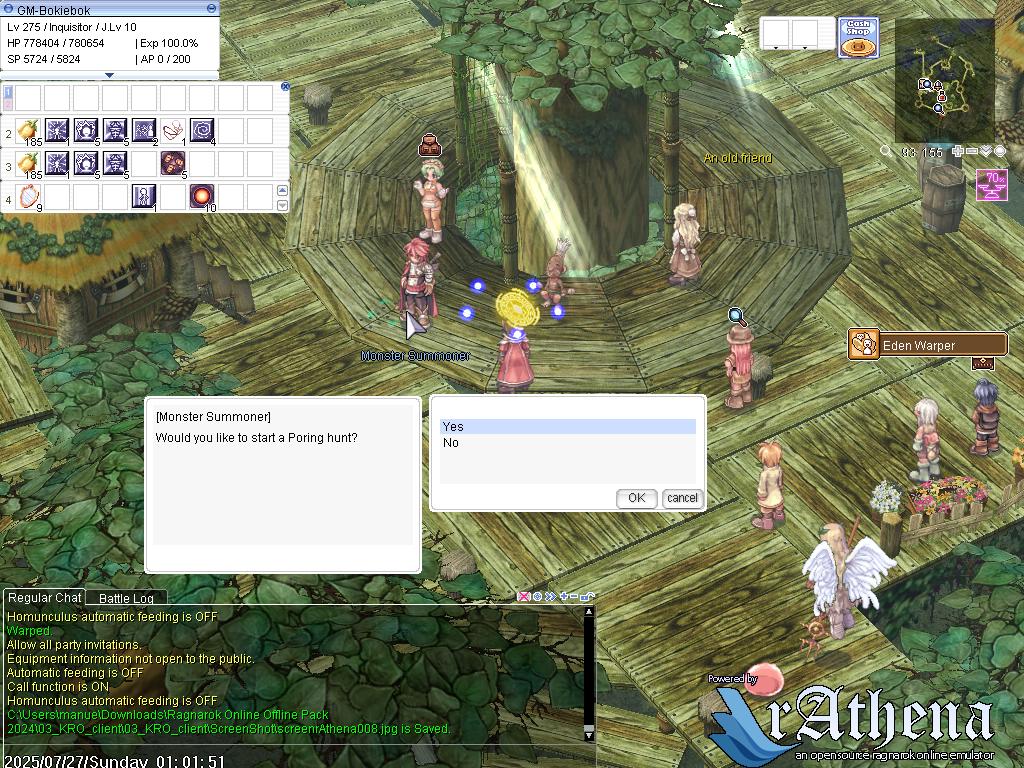
    if (select("Yes:No") == 2) {
        mes "[Monster Summoner]";
        mes "Come back later when you're ready.";
        close;
    }

    // Summon 5 Porings at random locations on umbala map.
    // The 'Monster Summoner::OnPoringKilled' label will be triggered when each Poring is killed.
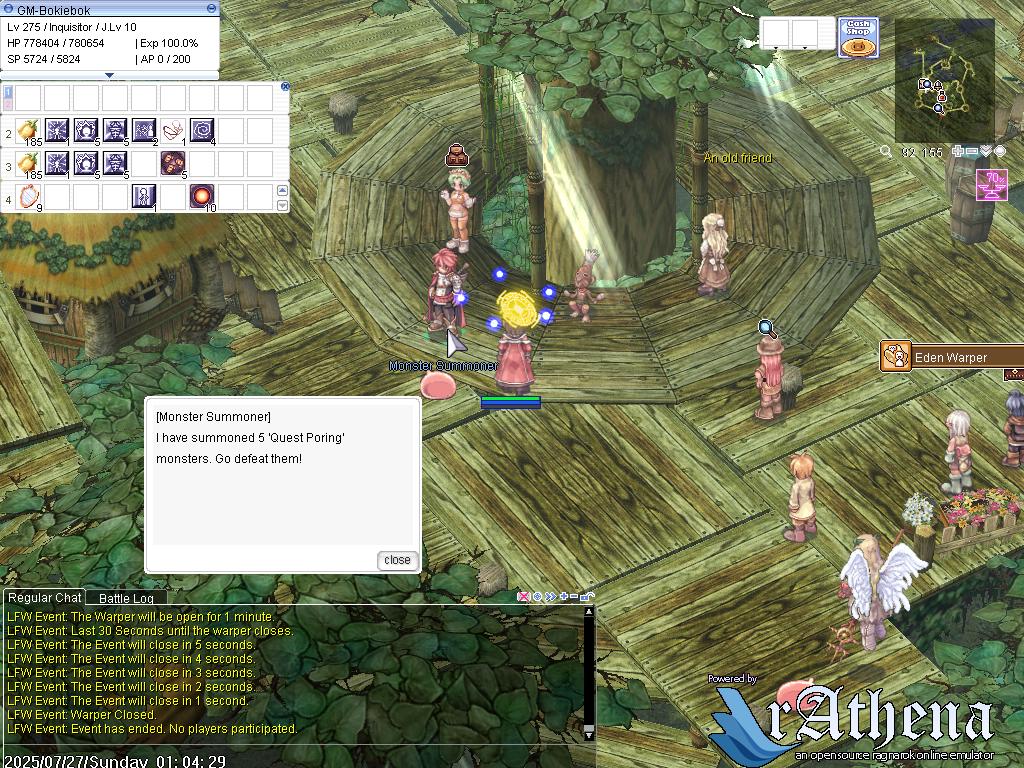
    monster "umbala",90,154,"Quest Poring",1002,5,"Monster Summoner::OnPoringKilled";

    mes "[Monster Summoner]";
    mes "I have summoned 5 'Quest Poring' monsters. Go defeat them!";
    set @porings_killed, 0; // Initialize kill counter for this player
    close;

OnPoringKilled:
    // This label is executed when a 'Quest Poring' spawned by this NPC is killed.
    // The 'killedrid' variable holds the mob ID (1002 for Poring).
    // The 'killedgid' variable holds the unique game ID of the killed monster.

    // Ensure a player is attached to the script before accessing player-specific variables.
    if (playerattached() == 0) {
        end; // No player attached, end script execution.
    }

    // Check if the killed monster is indeed a Poring (mob ID 1002).
    if (killedrid == 1002) {
        set @porings_killed, @porings_killed + 1;

        if (@porings_killed < 5) {
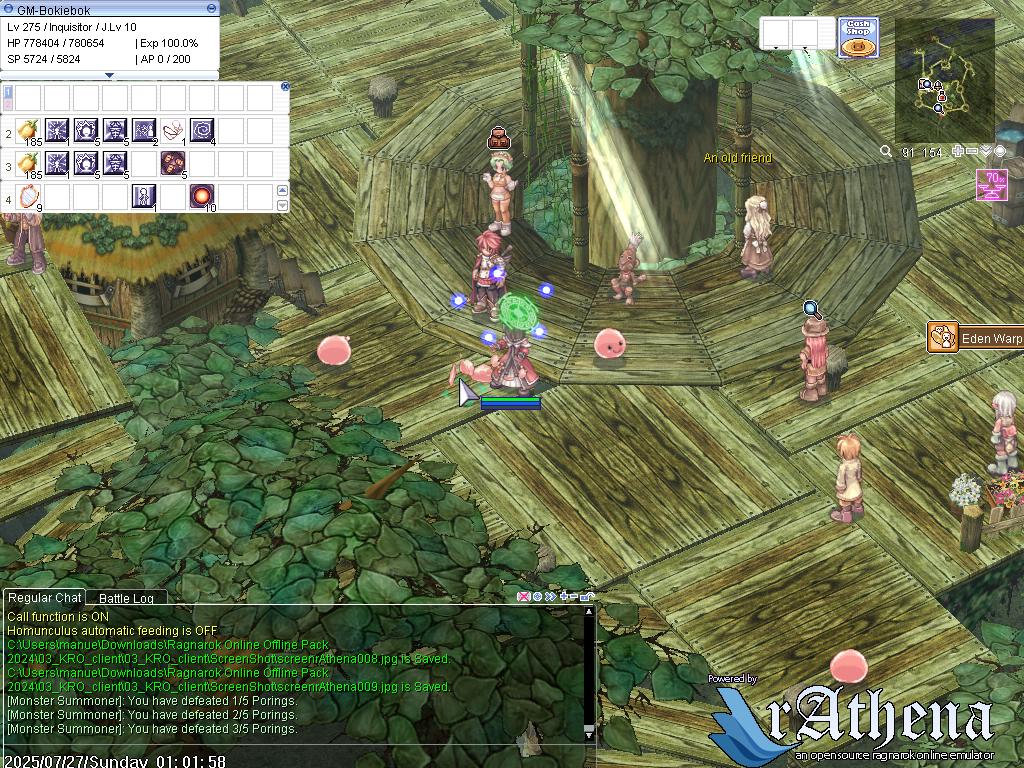
            dispbottom "[Monster Summoner]: You have defeated " + @porings_killed + "/5 Porings.";
        } else {
            dispbottom "[Monster Summoner]: You have defeated " + @porings_killed + "/5 Porings.";
            dispbottom "Congratulations! You have defeated all the summoned Porings!";
            set @porings_killed, 0; // Reset counter for future hunts
        }
    }
    end;
}
In this script:
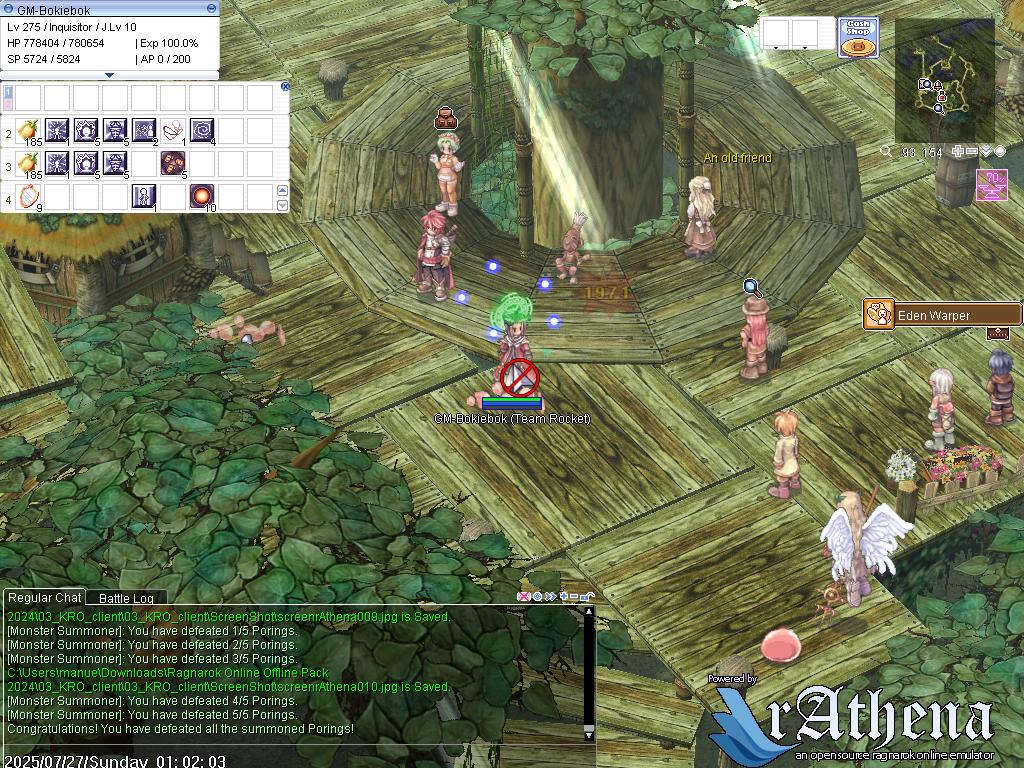
This script defines a Monster Summoner NPC that facilitates a 'Poring hunt' for players. When a player interacts with the NPC, they are given the option to start the hunt.
If the player agrees, the NPC summons 5 'Quest Poring' monsters at 90,54 coordinate location on the 'umbala' map. A unique event label, Monster Summoner::OnPoringKilled, is attached to these summoned monsters.
Each time a 'Quest Poring' is defeated, the OnPoringKilled label is triggered. The script then increments a player-specific kill counter (@porings_killed).
The player receives real-time updates on their progress via dispbottom messages. Once all 5 summoned Porings are defeated, a congratulatory message is displayed, and the kill counter is reset, allowing the player to start a new hunt if desired.